 Interfaceby techbao666 · GitHub · e-paper
Interface · experiment
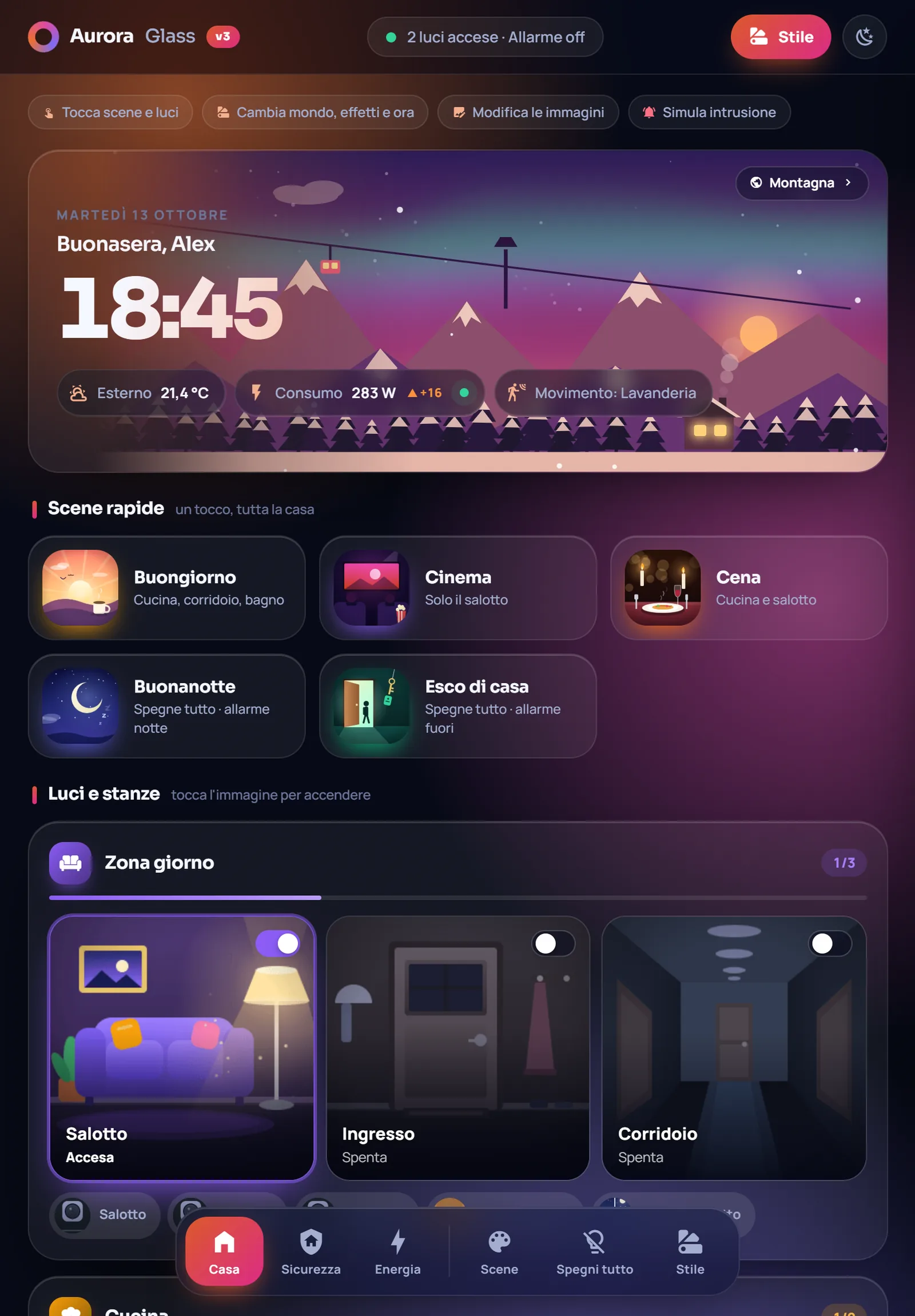
A Home Assistant wall tablet that lives by the sun
One custom Lovelace card turns a smart home dashboard into an animated scene, with a sky, sun and moon that track real time and eleven weather effects.
Can I build this?Beginner · AI 5/5 · $0
- Difficulty
- Beginner
- AI-buildability
- 5/5
- Time
- A weekend
- Cost
- $0
It's a single JavaScript Lovelace card plus YAML config on an existing Home Assistant setup, so AI can write nearly all of it and the reader only copies files and maps entities.
Tools
Home Assistantweb browserfile editor
Starter prompt
Based on "A Home Assistant wall tablet that lives by the sun" on Afterware: https://afterware.xyz/p/a-home-assistant-wall-tablet-that-lives-by-the-sun
Help me write a custom Lovelace card for Home Assistant that shows a live sky background tied to the real time of day, with a sun and moon moving across it. Add a weather overlay that switches between rain, snow and clear based on a weather entity. Package it as a single JavaScript module I can load from /local/ and reference with a custom: element name in YAML.
Estimates based on the original write-up. How AI-buildability is scored. Building with an AI assistant? Connect it to Afterware (free MCP server).
Story
Open the dashboard at night and the little house has lit windows under a real moon. Come morning the sky shifts with the clock, and the card throws in rain, snow, storm, fireflies or fireworks on top. It's one JavaScript file with no build step and no cloud, and everything runs locally, apart from Google Fonts.
The card is installed as a custom Lovelace element. You copy a folder into Home Assistant's www directory, add it as a JavaScript module resource, then paste a YAML config into a new dashboard and map your entities. It ships with 50 image and GIF buttons for lights, scenes, sensors, alarm and climate, plus an energy view that multiplies kWh by your tariff to show costs in euro or any currency.
Worth stealing if your wall tablet looks like a spreadsheet. The animated-scene approach works on any Lovelace dashboard, and the energy view is a nice model for turning raw watts into something a household will actually read.
More like this


More like this
Interfaceby techbao666 · GitHub · e-paper