 Hardwareby HermannBjorgvin · GitHub
Hardware · build
Toki: a StackChan that watches Claude work
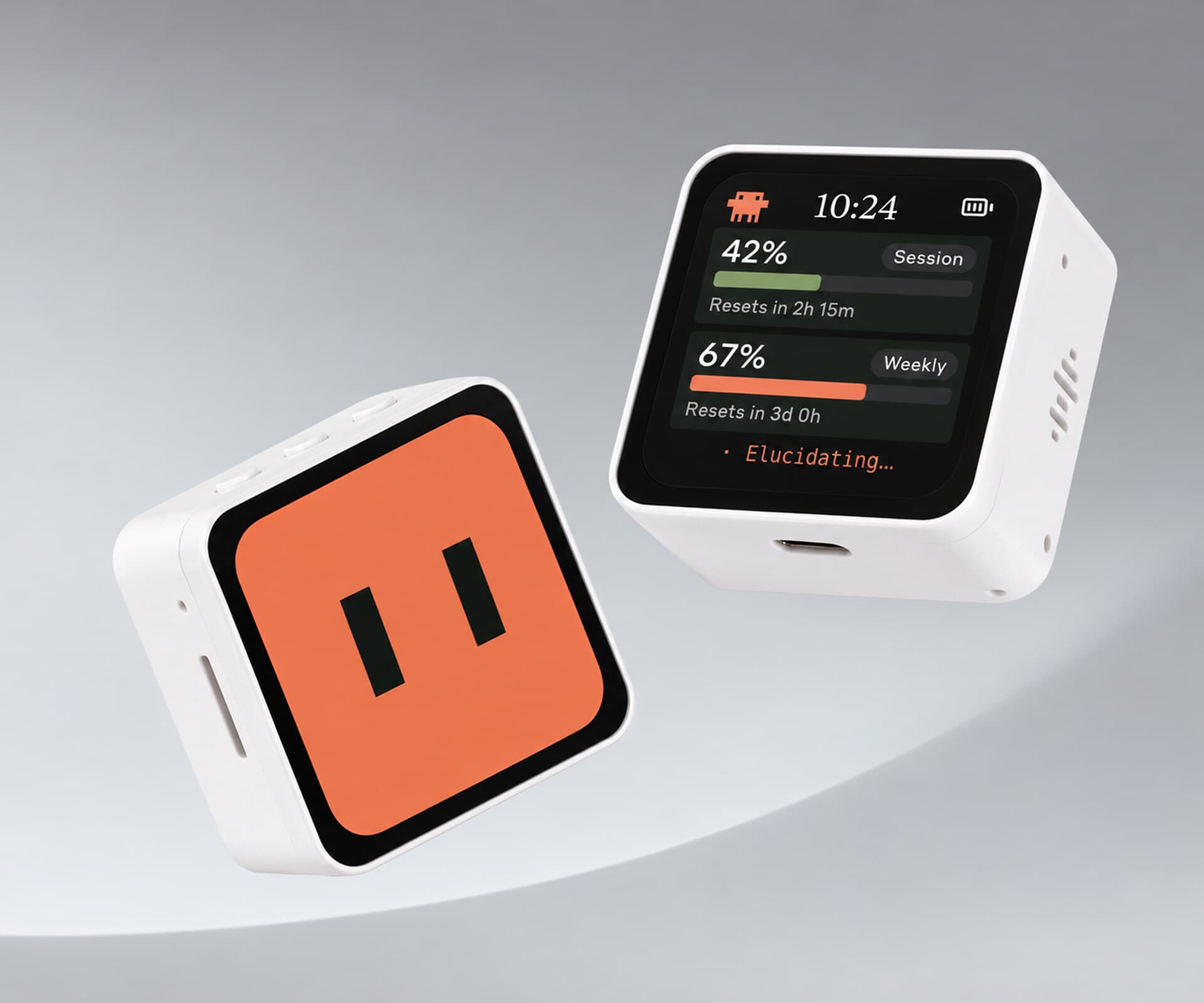
An M5Stack StackChan wears Claude's workload on its face: a magnifier for search, a sweat drop for tests. When Claude needs a yes or no, it glows amber and waits for your tap.
Build sheet
- Device page
- M5Stack StackChan →
- Device
- M5Stack StackChan K151
- Controller
- CoreS3 (ESP32-S3)
- Firmware
- Arduino, StackChan-BSP
- Host
- Node bridge on macOS
Can I build this?Beginner · AI 4/5 · $100–200
- Difficulty
- Beginner
- AI-buildability
- 4/5
- Time
- A weekend
- Cost
- $100–200
Nearly all the work is software and flashing firmware onto a purchased robot, with no soldering described.
Tools
USB-C cableMac with Homebrewarduino-cli
Starter prompt
Based on "Toki: a StackChan that watches Claude work" on Afterware: https://afterware.xyz/p/toki-a-stackchan-desk-robot-for-claude-agents
Write Arduino firmware for an M5Stack CoreS3 on a StackChan body that shows a different face expression for each state reported by a Node bridge over Wi-Fi: idle, reading, running a command, searching, testing, and waiting for approval. When waiting, raise the head servo and show an amber glow, and let a touch on Allow or Deny send the answer back to the bridge.
Estimates based on the original write-up. How AI-buildability is scored. Building with an AI assistant? Connect it to Afterware (free MCP server).
Story
Toki's face changes with whatever Claude is doing: reading, running a command, searching the web, testing. Each job gets a small manga-style symbol, a magnifier for search, a sweat drop for tests. When Claude needs approval, the robot looks up and glows amber. Tap the touchscreen to allow or deny. It runs on an M5Stack StackChan K151 built around a CoreS3.
The servos are loud, so the head only moves for interruptions. It rises when Claude is waiting, nods when you approve a request, and wiggles at the end of the day. Long-press the face and a shop shutter drops over the robot. Tap, and it goes back up.
Behind it, a Node bridge on the Mac catches Claude Code hooks and keeps a local scrapbook: one sticker per prompt, plus extras for notable moments. The robot runs its own Arduino firmware, so it can keep working over Bluetooth with the bridge switched off.
Resources · 3
More like this

More like this
Hardwareby HermannBjorgvin · GitHub Videoby deepakpopli · GitHub · open hardware